Quantexa Technical Business Analyst Academy (TBAA)
Key Details: Assessment: Knowledge Check / Tasks / Project Assessment Duration: 5 weeks, full time Max Time Allowed to Complete: 4 months Format: eLearning & project work Product version: 2.1.1 Training Credit Classification: Certification Summary The Quantexa Technical Business Analyst Academy is an in-depth program that gives learners the skills needed to become a Technical Business Analyst on a Quantexa project. This updated version of the BA Academy, released on 2.1.1 of the Quantexa Platform, incorporates elements of the new Data Engineer and Scoring Engineer Academies and combines that with a detailed BA end-to-end project perspective. This program has multiple knowledge checks throughout and checkpoint reviews to ensure progress of the learners. It also includes a final assessment at the end signed off by a Quantexa Business Analyst. ✔ Ideal Candidates for the Quantexa TBA program Each of our certification programs is complex in nature and is best suited to individuals that have an associated set of prerequisite skills and experience that will support their ability to obtain the related certification. Here’s the recommended criteria for the Technical Business Analyst Certification program. High technical capability to query and profile large data volumes Hands-on experience in designing technical solutions to problems. Capability and experience of deploying statistical approaches and methods. Deep understanding of data mapping and relational data bases. Experience in designing data processing, such as ETL and parsing, and handling data quality-related issues. Strong solution design experience. Background in classic SI project development, product management, functional definition, or UI design roles. Familiarity with the Agile development methodology, JIRA, and requirements backlog management. Experience of working on data-specific projects, with exposure to fraud, financial crime, customer insight or compliance-based environments that utilize detection or predictive models. When working on a project, ability to produce designs and solutions and own aspects of the project, such as: Network design, including supporting models required, Data selection and understanding, Score design including initial validation and tuning, Entity Resolution, UI Design. Modules include: Quantexa Technical Foundations Program - Introduces the core concepts of our Platform, including Networks, Documents, Entities, and Entity Resolution, as well as some of its more technical components, namely Fusion and Assess. This Program also introduces Search, Investigation and Task components of the Quantexa UI. Development Tools - Teaches the key tools that will be used during the development of a project. Teaches the common Scala and Spark commands used when interrogating the ingested data. Smoke Test - Teaches the required steps to deploy the Quantexa Platform and confirm the correct setup of their environment. Data Preparations: Teaches data considerations that a Business Analyst need to address before carrying out the ETL process to make sure it produces correct outcomes. Data Ingestion - ETL Process: Covers in detail each of the steps in the Data Ingest – ETL Process. Dives into the aspects required for designing and building the appropriate Document-Entity Model with Fusion. How to Read Fusion Files - Teaches a contextual approach to Fusion files and help Business Analysts locate and understand key stages of the configuration. Resolver Configuration - Teaches a contextual approach to Resolver Config and help Business Analysts locate and understand all sections of the configuration. Investigating ER Issues - Provides Business Analysts with tools and approaches to handling Entity Resolution issues. Teaches Business Analysts how to identify and analyze possible triggers for Entity health checks as well as how to detect common problems. Scoring - Teaches concepts and approaches to Scoring and explains the Business Analyst’s involvement at each stage. Provides Scoring considerations and the requirements for capturing the Scoring business logic and Scorecard Tuning. Network Generation - Teaches the core concepts of Network Generation and covers steps and approaches on how to build a Network for all the required Scores. Academy Task - Assesses the learner's ability to design a Quantexa project, from end to end, that identifies the desired cases of risky behavior using the concepts covered in the previous modules. Outcome: On successful completion learners will be awarded the Quantexa Technical Business Analyst Certification (including the associated badge and certificate). NOTE: If you wish to just review the content of the Quantexa Technical Business Analyst Academy, there is a Review pathway, which you can also request to be onboarded onto.118Views0likes0CommentsQuantexa Scoring Engineer Academy (SEA)
Prerequisite Assessment: Scala and Spark Assessment: Knowledge Check / Tasks / Project Assessment Duration: 6 weeks, full time Max Time Allowed to Complete: 4 months Format: eLearning & project work Product version: 2.1.1 Training Credit Classification: Certification Summary: The Quantexa Scoring Engineer Academy qualifies the individual to write key detection logic that can be implemented within the Quantexa Assess framework. This learning program takes you through five key scoring approaches and is assessed by a project-based task at the end. An environment is provided to every user where they build a ‘proof of concept’ Quantexa Platform. 💡 Program versions - impact on onboarding From an onboarding perspective, this program has two versions: For Quantexa Certified Data Engineers, and For Non-Certified Data Engineers. Please bear this in mind when completing the enrollment process. ✔ Ideal Candidates for the Quantexa SEA program Each of our certification programs is complex in nature and is best suited to individuals that have an associated set of prerequisite skills and experience that will support their ability to obtain the related certification. Here’s the recommended criteria for the Scoring Engineer Certification program. Data Engineering background or the following Data Science background: Programming experience (ideally using an object-orientated programming language, such as Java, Scala (preferred), R, or Python), and/or Experience in more traditional data processing tools, such as SAS or SQL. Exposure to fraud, financial crime, customer insight or compliance-based environments that utilize detection or predictive models. Experience in the Agile development methodology. Familiarity with statistical approaches and methods and their application on projects. Familiarity with data mapping, meaning of relational data, and object orientation. Experience in interpreting project needs and translating these into detection models. Experience in explaining and presenting analytical results. Experience of working with model documentation, ideally AML model governance. Scala and Spark Pre-requisite Assessment A fundamental understanding of Scala and Spark is key to ensuring learners' success as a Quantexa Scoring Engineer. With this being the case, there is a Scala and Spark pre-requisite assessment that has been designed to ensure that you have the necessary skills to complete the associated Academy Tasks and, consequently, to qualify as a Quantexa Certified Scoring Engineer. You can learn more about it in this article: Scala Prerequisite Assessment for Quantexa Certification Academies. Modules include: Quantexa Technical Foundations Program - Introduces the core concepts of our Platform, including Networks, Documents, Entities, and Entity Resolution, as well as some of its more technical components, namely Fusion and Assess. This Program also introduces Search, Investigation and Task components of the Quantexa UI. Environment Setup - Prepares learners for setting up their environment required for the Academy Task and explains some of the relevant tools needed. Document Scores - Covers the overall concepts of the Assess Framework and the Directed Acyclic Graph (DAG). It also explains how to implement, validate and test Document Scores. Entity Scores – Introduces different Score levels, aggregation and rolling down of Entity Scores, plus testing and validation methods. Network Scores - Consists of technical implementation of Network Score, where the LiteGraph data is used as an input as an alternative to parquet files. It also introduces a different approach to test data for Unit testing. Event Scores - Teaches the approach to Event Scores using Transaction data and rolling up to a Document level, along with testing and validation methods. Dynamic Scoring – Explains the main differences between Batch and Dynamic Scoring and how to implement a Score context. It also includes Batch lookup configuration and reading and writing from Elasticsearch. Also covered are the validation methods using the Dynamic end-to-end test. Academy Task - Introduces the learner to the required assessment of skills and knowledge in developing a range of Scores. The Academy Task is split into four parts covering Document, Entity, Network and Batch Lookup Scores using techniques covered in the previous modules. Outcome: On successful completion learners will be awarded the Quantexa Scoring Engineer Certification (including the associated badge and certificate). NOTE:If you wish to just review the content of the Quantexa Scoring Engineer Academy, there is a Review pathway, which you can also request to be onboarded onto.84Views0likes0CommentsScala and Spark Bootcamp
This program has been designed to enable candidates to successfully complete the Scala and Spark prerequisite assessment within a 5-Day period. Key Details: Duration: 5 Days Format: Instructor Led Workshops Delivered by: Quantexa Maximum Class Size: 12 Support Model: In Person Delivery Format: The programs are offered in both private and publicly scheduled events, based on interest. Event Scheduling Enquiries: Interested parties should contact their respective Quantexa Alliances or Technology Account Partner Modules include: Scala fundamentals (data types, functions, higher-order functions, case classes and pattern matching) Functional programming principles Apache Spark and the Dataset API Using SQL joins in Apache Spark Integrating Scala fundamentals with Dataset API functions to transform datagram Structure: Outcome: On successful completion learners will be awarded the Scala & Spark Bootcamp Graduate Badge (including the associated badge and certificate).87Views0likes0CommentsQuantexa Data Engineer Velocity Program (DEVP)
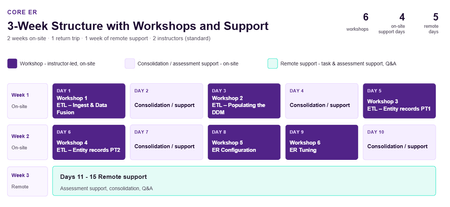
Core ER Program - DE Velocity Version Key Details: Prerequisite Assessment: Scala and Spark fundamental understanding (Assessment) Self Paced or Instructor Led SSB version Duration: 3 weeks full-time Format: Instructor Led, eLearning & project work Delivered by: Quantexa Maximum Class Size: 12 Support Model: Dedicated In-Person & Remote Support Calls Delivery Format: The delivery schedule is as outlined under Workshop Delivery Schedule. Training Event Formats: These programs are available as a private event. Event Scheduling Enquiries: Please contact your Customer Success or Alliances Representative for further details. Product version: 2.8.x Summary: An in-depth technical accelerated enablement program for data engineers working with the Entity Resolution (ER) functionality of the Quantexa Platform, with a strong focus on the Data Ingestion stage. Users are expected to complete a series of activities and graded assessments to demonstrate their practical skills. Modules include: ETL Ingest & Data Fusion Workshop ETL 1: Populating the Document Data Model Workshop ETL 2: Entity Records PT1 Workshop ETL 3: Entity Records PT2 Workshop Entity Configuration Workshop Entity Resolution Tuning Workshop Workshop Delivery Schedule Outcome: On successful completion learners will be awarded the Quantexa Data Engineer: Core ER Certification (including the associated badge and certificate). Core Platform Program - DE Velocity Version Key Details: Prerequisite Assessment: Scala and Spark fundamental understanding (Assessment) Self Paced or Instructor Led SSB version Duration: 4 weeks full-time Format: Instructor Led, eLearning & project work Delivered by: Quantexa Maximum Class Size: 12 Support Model: Dedicated In-Person & Remote Support Calls Delivery Format: The delivery schedule is as outlined under Workshop Delivery Schedule. Training Event Formats: These programs are available as a private event. Event Scheduling Enquiries: Please contact your Customer Success or Alliances Representative for further details. Product version: 2.8.x Summary: An in‑depth technical accelerated enablement program for data engineers who want broader, end‑to‑end knowledge of the Quantexa Platform. Learners complete a modular learning journey with practical activities, integrated knowledge checks and graded assessments to demonstrate their practical skills. Modules include: ETL Ingest & Data Fusion Workshop ETL 1: Populating the Document DataModel Workshop ETL 2: Entity Records PT1 Workshop ETL 3: Entity Records PT2 Workshop Entity Configuration Workshop Entity Resolution Tuning Workshop UI Config PT1 Workshop UI Config PT2 Workshop Scoring with Assess Workshop Workshop Delivery Schedule Outcome: On successful completion learners will be awarded the Quantexa Data Engineer: Core Platform Certification (including the associated badge and certificate).65Views0likes0CommentsQuantexa Data Engineer Academy (DEA) -Release 1
[No longer available for enrolment] Key Details: Prerequisite Assessment: Scala and Spark Assessment: Knowledge Check / Tasks / Project Assessment Duration: 6-8 weeks, full time, depending on how closely candidates meet the "Ideal Candidate" criteria. Max Time Allowed to Complete: 4 Months Format: eLearning & project work Product version: 2.0.1 Training Credit Classification: Certification Summary: The Quantexa Data Engineer Academy is an in-depth program aimed to teach Data Engineers how to build Quantexa Platforms. An environment is provided to every user where they build a ‘mini-proof of concept’ Quantexa Platform. Their work is then assessed by a Quantexa Academy Team Lead and a Quantexa Technical Specialist. Modules include: Quantexa Technical Foundations Program - Introduces the core concepts of our Platform, including Networks, Documents, Entities, and Entity Resolution, as well as some of its technical components, namely Fusion and Assess. This Program also introduces Search, Investigation and Task components of the Quantexa UI. Extract, Transform & Load - Both a conceptual and technical deep dive into the data ingestion steps and preparation required for building the appropriate Document-Entity Model with Fusion. Entity Resolution - Teaches a contextual approach to Entity Resolution and the required technical configuration. App Architecture - Teaches developers how to deploy the Quantexa Platform and the functions and configuration of the required applications. Network Analytics - Teaches the different techniques for generating Networks and a provides technical walkthrough of how to score a Document using Assess. User Interface - Teaches the customization for standard UI components of the Platform. Module Tasks & Final Certification Assessment - The learners develop their own end-to-end deployment of the Quantexa Platform. Outcome: On successful completion learners will be awarded the Quantexa Data Engineer Certification (including the associated badge and certificate). NOTE: If you wish to just review the content of the Quantexa Data Engineer Academy, there is a Review pathway, which you can also request to be onboarded onto.49Views0likes0CommentsQuantexa Data Engineer Academy (DEA) - Release 2
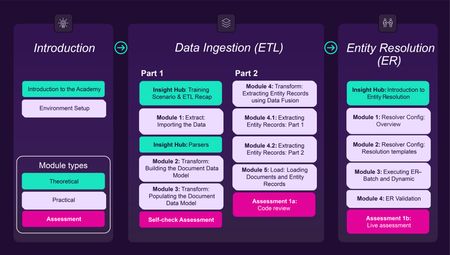
Summary: The Quantexa Data Engineer Academy is an in-depth program aimed to teach Data Engineers how to build Quantexa Platforms. An environment is provided to every user where they build a ‘mini-proof of concept’ Quantexa Platform. Their work is then assessed by a Quantexa Academy Team Lead and a Quantexa Technical Specialist. With Release 2, the Data Engineer Academy now offers two pathways: the Core ER Certification (ER‑focused) and the Core Platform Certification for learners seeking broader, end‑to‑end knowledge of the Quantexa Platform. ✔ Ideal Candidates for the Quantexa DEA program Each of our certification programs is complex in nature and is best suited to individuals that have an associated set of prerequisite skills and experience that will support their ability to obtain the related certification. Here’s the recommended criteria for the Data Engineer Academy. Hands-on development experience (Java, Scala, etc.) via system integration projects or as a data scientist. Experience of working on fraud, financial crime, customer insight or compliance-based projects that utilize detection or predictive models. Experience in the Agile development methodology. Experience of working on projects involving statistical approaches or detection logic. Familiarity with data mapping, relational data, and object orientation. Familiarity with data processing methods, such as ETL, parsing and handling data quality-related issues. Experience of working with operational environments, DevOps, restart/recovery, etc. Experience with Hadoop, Spark, Scala (or Java), or, less ideally, Python, Elastic (optional), RESTful APIs, JSON, and Tomcat. Development environment skills (code control, IDEs), understanding of such processes as unit testing, design, and documentation. Scala and Spark Pre-requisite Assessment A fundamental understanding of Scala and Spark is key to ensuring learners' success as a Quantexa Data Engineer. With this being the case, there is a Scala and Spark pre-requisite assessment that has been designed to ensure that you have the necessary skills to complete the associated Academy Tasks and, consequently, to qualify as a Quantexa Certified Data Engineer. You can learn more about it in this article: Scala Prerequisite Assessment - CoderPad. Core ER Program Prerequisite Assessment: Scala and Spark Assessment: Knowledge Check / Tasks / Project Assessment Duration: *Dependent on how well the candidate matches the program's ideal candidate selection criteria: Approximately 4 weeks full-time* For part-time, see Self Paced Completion Times Max Time Allowed to Complete: 2 Months Format: eLearning & project work Product version: 2.8.1 Training Credit Classification: Certification Summary: An in-depth technical program for data engineers working with the Entity Resolution (ER) functionality of the Quantexa Platform, with a strong focus on the Data Ingestion stage. Users are expected to complete a series of activities and graded assessments to demonstrate their practical skills. Modules include: Part 1 – Introduction: Academy Overview and environment setup (VDI, IntelliJ, and Elasticsearch). Part 2 – ETL 1: Importing raw data sources, understanding and configuring Parsers, building and populating the Document Data Model. Part 3 – ETL 2: Extracting Entity records using Data Fusion, loading Documents and Entity Records into Elasticsearch. Part 4 – Entity Resolution: Configuring and executing Batch and Dynamic ER using the Resolver, validating resolution quality. Outcome: On successful completion learners will be awarded the Quantexa Data Engineer: Core ER Certification (including the associated badge and certificate). Self Paced Completion Times Effort Approximate time to complete Full Time (5 days a week) 4 weeks Part Time - 4 days a week 5 weeks Part Time - 3 days a week 6.5 weeks Part Time - 2 days a week 10 weeks Part Time - 1 day a week 20 weeks* *Falls outside of standard program duration allowance plus permitted 2-month extension – not advised Core Platform Program Prerequisite Assessment: Scala and Spark Assessment: Knowledge Check / Tasks / Project Assessment Duration: *Dependent on how well the candidate matches the program's ideal candidate selection criteria: Approximately 5 weeks full-time* For part-time, see Self Paced Completion Times Max Time Allowed to Complete: 4 Months Format: eLearning & project work Product version: 2.8.1 Training Credit Classification: Certification Summary: An in‑depth technical program for data engineers who want broader, end‑to‑end knowledge of the Quantexa Platform. Learners complete a modular learning journey with practical activities, integrated knowledge checks and graded assessments to demonstrate their practical skills. Modules include: Part 1 – Introduction: Academy Overview and environment setup (VDI, IntelliJ, and Elasticsearch). Part 2 – ETL 1: Importing raw data sources, understanding and configuring Parsers, building and populating the Document Data Model. Part 3 – ETL 2: Extracting Entity records using Data Fusion, loading Documents and Entity Records into Elasticsearch. Part 4 – Entity Resolution: Configuring and executing Batch and Dynamic ER using the Resolver, validating resolution quality. Part 5 – UI Configuration: Configuring the Quantexa User Interface: Search 2 setup, Viewers (Document, Entity, Search Result), Investigations (Resource Viewer, Network View), and Dynamic Expansions. Part 6 – Scoring with Assess: Designing and implementing Scores at Document and Entity level, configuring Scorecard; executing Scores in Batch and Dynamic modes; validation (unit tests, checkpoints, Scorecard and UI validation). Outcome: On successful completion learners will be awarded the Quantexa Data Engineer: Core Platform Certification (including the associated badge and certificate). Self Paced Completion Times Effort Approximate time to complete Full Time (5 days a week) 5 weeks Part Time - 4 days a week 6.5 weeks Part Time - 3 days a week 8.5 weeks Part Time - 2 days a week 12.5 weeks Part Time - 1 day a week 25 weeks* *Falls outside of standard program duration allowance plus permitted 2-month extension – not advised201Views0likes0CommentsQuantexa Task Loading (QTL) Certification
Key Details: Assessment: Assessed Duration: 1-2 Weeks Max Time Allowed to Complete: 4 Months Format: eLearning & project work Pre-requisite: Quantexa Certified Data Engineer Summary: In-depth program designed to help Quantexa Certified Data Engineers implement and customize Task Loading on a project. An environment is provided where trainees can customize Task Loading within the Quantexa User Interface. Their work and theoretical knowledge are then assessed by a Quantexa Academy Team Lead. Modules include: Task Loading: Environment Setup and Smoke Test - This module provides a comprehensive walkthrough of configuring and testing the Virtual Desktop Infrastructure (VDI) environment. Task Loading: Process and Customization - This course provides a comprehensive introduction to Task Loading, a critical component of Quantexa deployments. Outcome: On successful completion learners will be awarded Quantexa Certified Task Loading Specialist certification.62Views0likes0CommentsManaging Quantexa Projects (MQP)
Assessment: Knowledge Check Duration: 4-5 Days Max Time Allowed to Complete: 3 Months Format: eLearning Training Credit Classification: Foundation Summary: This programme gives individuals an introduction to the management and delivery of projects aimed at implementing the Quantexa Platform. Learners will gain a good understanding of the key components of the Quantexa Platform, and focus will be given to the specific areas of work for the project. The future project managers will also learn about the tasks required on a project and the key aspects of project delivery. Modules include: Quantexa Technical Foundations Program - Introduces the core concepts of our Platform, including Networks, Documents, Entities, and Entity Resolution, as well as some of its more technical components, namely Fusion and Assess. This Program also introduces Search, Investigation and Task components of the Quantexa UI. Managing Quantexa Projects - Covers the key aspects of a typical project implementing the Quantexa Platform. It will focus on areas that are critical to the technology implementations. Outcome: On successful completion of the program and the Knowledge Check, learners will be awarded the Managing Quantexa Projects completion badge and certificate.45Views0likes0CommentsQuantexa Technical Foundations (QTF)
Key Details: Assessment: None Duration: 2-3 Days Max Time Allowed to Complete: 3 Months Format: eLearning Training Credit Classification: Foundation Summary: Quantexa Technical Foundations is an extension to the User Foundations program that also introduces some of the more technical components of our Platform, namely Data Fusion (ETL) and Assess (Scoring). This program is more suitable for those individuals who will be working with our Platform in a technical capacity, for example Data Engineers, Scoring Engineers, Technical Business Analysts and Architects. Modules include: Introduction to Quantexa Decision Intelligence Platform 🆕 - Explains the Platform’s main capabilities and the key benefits it offers to our customers. Core Concepts - Introduces the key Platform concepts, including Networks, Documents, Entities, and Entity Resolution Search - Teaches end users how to search for Documents and Entities of interest. Investigations - Teaches end users how to use the Investigations and Tasks components of the Quantexa UI. ETL and Data Fusion – Explains the key concepts related to the Extract, Transform, and Load (ETL) process utilizing Data Fusion. Scoring with Assess – Introduces the key concepts and functionalities of the Platform’s Modelling and Scoring capability: Assess. Outcome: On successful completion of the program, learners will be awarded the Quantexa Technical Foundations completion badge and certificate. NOTE: The Quantexa Technical Foundations program is part of four certification programs: (1) Data Engineer Academy (2) Scoring Engineer Academy (3) Technical BA Academy (4) Platform Architecture Academy56Views0likes0CommentsQuantexa Investigations Series: Insurance Fraud Investigator (QIS:IFI)
Key Details: Assessment: None Duration: 2 Days Max Time Allowed to Complete: 3 Months Format: eLearning Training Credit Classification: Foundation Summary: A scenario-driven learning experience for P&C Insurance Fraud Investigators, focused on using the Quantexa Platform to simplify fraud detection. Centred around the Konrad Solorio case, it teaches key Quantexa concepts and tools to help investigators conduct effective insurance fraud investigations. Modules include: P&C Insurance Fraud Investigator: Foundation - This module covers key concepts, investigative techniques, and practical applications through a fictional scenario. P&C Insurance Fraud Investigator: Konrad Solorio Case - This module covers an end-to-end investigation centered on a fictional character of Konrad Solorio and his accomplices. Outcome: On successful completion learners will be awarded the Quantexa Insurance Fraud Investigator completion badge.34Views0likes0Comments