FAQ: 💻️ VDI Usage and Common Issues
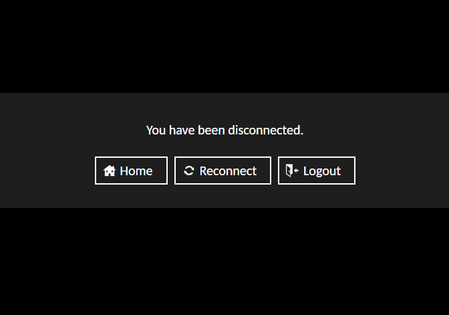
FAQ relevant for: Academies that require a VDI Your training VDI can be accessed via this link. Before it can be used however, you will need to start the machine that it runs on and you also should stop the machine after you have finished using it. The VDI can be started and stopped via this page on the Quantexa Community, and there is also a refresh button to check the status of the VDI. After you start the VDI, you will need to wait a few minutes for it to boot up before it will be accessible. Common VDI issues & error messages: “You have been disconnected.” - This message will appear when the VDI hasn’t been started yet. To solve it you just need to start the VDI and wait a few minutes. “An internal error has occured within the Guacamole server, and the connection has been terminated. If the problem persists, please notify your system administrator, or check your system logs.” - This message will sometimes appear if you have started your VDI but then tried to access it before it has fully booted up. If you want a few more minutes then this should disappear and your VDI should be useable. If you still can't access your VDI after 10-15 minutes, it's likely due to your organization's firewall. “The Guacamole server is denying access to this connection because you have exhausted the limit for simultaneous connection use by an individual user. Please close one or more connections and try again.” - This message will appear if you try to access the VDI from more than one browser tab at once, but also sometimes can appear at random (possibly caused by network issues). To solve it, close all tabs then wait a second before trying to open a fresh VDI tab. Alternatively you can hit the “Logout” button then on the next page the “Re-login” button and this usually fixes it too. Poor network conditions may cause this problem to persist. "The remote desktop server is currently unreachable. If the problem persists, please notify your system administrator, or check your system logs." - This error message means there is something wrong with the boot disk of the VDI and will need to be resolved by our cloud team. In this instance, please reach out to an ATL or create a new post in the Academy Q&A topic and we will get the team to resolve it for you. If any of the above problems persist and you are unable to solve them, then please reach out to the training team via the Academy Q&A Topic.4.4KViews2likes9Comments
QPython User Guide - Module 2: Quantexa Knowledge Graph — Now Available
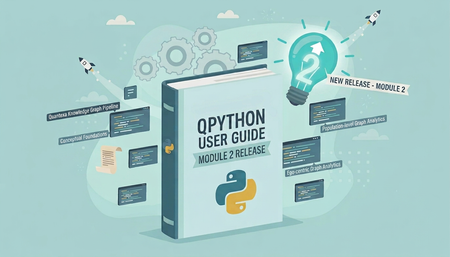
We're excited to launch the QPython User Guide - Module 2: Quantexa Knowledge Graph on the Community — our second QPython-based module, following the release of Processing Quantexa Assets in February 2026. Target Audience This User Guide is designed for: Data Scientists Data Analysts Anyone working with Quantexa Batch Resolver outputs who wants to explore and apply the full capabilities of the Quantexa Knowledge Graph Technical Requirements To get started, you will need: A Quantexa license to run Knowledge Graphs Access to Quantexa Batch Resolver output Access to QPython and Quantexa Knowledge Graph libraries Working knowledge of Python (no Scala required) Program Format This is a Community-based User Guide, available to all registered members. Throughout the Guide, you’ll work hands-on with core capabilities of the Quantexa Knowledge Graph. This includes leveraging Batch Resolver outputs, exploring graph data interactively, and creating new relationships between nodes and edges through Analytical Perspectives. You’ll also be introduced to scalable graph analytics, such as PageRank, and learn how to export your outputs into widely used open-source formats, including Parquet, NetworkX, SciPy, GraphFrames, and PyTorch. Get Started You can jump straight in - no enrolment or VDI is required, and all content is accessible directly through the Community Platform. Explore Now! Duration We recommend allowing 2–3 days (full-time) to work through the complete set of lessons and hands-on examples. Program Structure The User Guide is organized into four lessons, designed to be completed sequentially. 1. The Conceptual Foundations of the Quantexa Knowledge Graph Understand the principles and concepts that underpin the Quantexa Knowledge Graph. 2. The Quantexa Knowledge Graph Pipeline Learn how to construct and manage a Knowledge Graph. 3. Ego-centric Graph Analytics Explore graph data from a localized, neighborhood perspective. 4. Population-level Graph Analytics Scale your analysis across the full graph. Questions or Support If you have any questions about the content or how to get started: Reach out via the Community discussion channels, or Contact the Training Team (Education Services) directly. We hope you enjoy the program We’re excited to make this content available and hope you find it valuable as you continue building your expertise with the Quantexa Knowledge Graph. Your feedback plays an important role in helping us improve, so we encourage you to share your thoughts and experiences as you work through the Guide.🚀 QPython User Guide: Processing Quantexa Assets Release
The Education Services Team is pleased to announce the release of the QPython User Guide: Module 1 (Processing Quantexa Assets). The User Guide, built in close collaboration with R&D and made available on the Community Platform, is an introductory resource for data scientists and engineers who wish to leverage the QPython library to harness the power of Quantexa. This is pure Python. No Scala programming is required! What’s in the QPython User Guide? The User Guide covers the complete QPython suite and is split into three Modules. Module 1 - Processing Quantexa Assets (Released now) Module 2 - The Quantexa Knowledge Graph - to be released Q2 FY26 The module is designed using the Quantexa Platform 2.8.x and Python 3.11.x. What can you learn from Module 1? Module 1 covers using QPython to process the outputs from the Batch Quantexa Platform. Starting with the Quantexa Batch Resolver, you can process the results of Entity Resolution. Moving downstream to the Graph Generation stage, you can access the graphs in the Quantexa Scoring Graph. Finally, you can analyze the Scoring and Re-Alerting outputs. You will explore the key QPython library objects, giving you full access to the outputs from the Quantexa Pipeline. You will also learn how to use elements of PySpark and Pandas. QPython library objects BatchResolver() Entity() DocumentEntityEdges() ScoringGraph() Score() CheckpointReader() ScorecardReader() Realerting() How do I enroll in the program? No enrollments are necessary! The QPython User Guide is a Community resource freely available to registered users (Customers, Partners, and Quantexans) as part of the Community Training Program. Feel free to use it as a handy reference to support your project work or upskilling. Please follow the link below to access the User Guide: QPython User Guide: Module 1 (Processing Quantexa Assets) Special thanks! We would like to express our gratitude to the project SMEs who generously supported us in the development of this content, and in particular, Felix_Hoddinott , Ben_Houghton, and Tejan_Shah .152Views2likes0CommentsScala Prerequisite Assessment - Transition to CoderPad
As part of our continuous efforts to enhance the candidate and reviewer experience, the Education Team at Quantexa is introducing a new, streamlined approach to the Scala & Spark Prerequisite Assessment. We are transitioning from a manual submission process to an integrated online coding environment using CoderPad. This change is designed to improve efficiency, standardization, plagiarism detection capabilities, and overall assessment quality. Previous Process – Key Challenges Previously, candidates were required to: Download boilerplate code locally Set up their development environment Complete the assessment offline Upload their solutions manually While functional, this approach presented several challenges: ⚠️Candidate Challenges Time-consuming environment setup Technical issues related to system compatibility and access Inconsistent development environments impacting performance ⚠️ Reviewer Challenges Submissions across multiple files and formats Instances of duplicate or reused code across assessments Increased effort in validating authenticity and structure Introducing CoderPad! With CoderPad, the candidates can now complete their assessment in a controlled, ready-to-use coding environment, eliminating setup barriers and ensuring consistency. ✨ Key Features Pre-configured environment: No installation or setup required Integrated coding workspace: Write, run, and test code in one place Automated session control: Timed assessments with structured flow Centralized submission system: Eliminates fragmented or incomplete submissions Built-in monitoring capabilities: Helps ensure integrity and fairness and aids plagiarism detection. Any suspected malpractice may still result in further evaluation (e.g., viva assessments), in line with existing policies. Updated Process What remains the same: Assessment duration: 150 minutes Evaluation criteria: Functional programming principles Code quality and best practices Scala & Spark proficiency Passing the assessment remains mandatory for entry into academies. 📌 Final Note This transition marks a significant step toward a more efficient, scalable, and candidate-friendly assessment experience. We are confident that this enhancement will benefit both candidates and reviewers while maintaining the high standards expected from our academies.144Views0likes0Comments
New Elasticsearch Chrome Extension
Hi All, As you may have seen in FAQ: Broken Elasticsearch Head Chrome Extension Workaround the Elasticsearch extension we were using in the VDIs (Elasticsearch Head) is no longer supported by Google Chrome! We have now added a new extension called Multi Elasticsearch Heads to the VDIs to hopefully replace the old extension! This extension should both appear and function very similarly to Elasticsearch Head; however, if you are having any issues or have any questions on how to use the new extension, please let us know in the comments! How to add the new extension Step 1: To add the new extension, first you will need to run the following commands: cd ~ cp /opt/training/other-resources/chrome-plugins/ElasticMultiheadChrome.zip ~ unzip ElasticMultiheadChrome.zip -d ElasticMultiheadChrome Step 2: Open up files and navigate to the "Home" folder You should now see a folder called ElasticMultiheadChrome Step 3: Add the new extension to Chrome To do this you can either follow the instructions in the environment setup module or follow the guide in this comment! Remember to select the ElasticMultiheadChrome folder instead of the elastic_head folder! Step 4: Done! You should now be able to use the new extension! I hope this helps, and please let us know if you have any issues etc!926Views7likes6CommentsFAQ: Broken Elasticsearch Head Chrome Extension Workaround
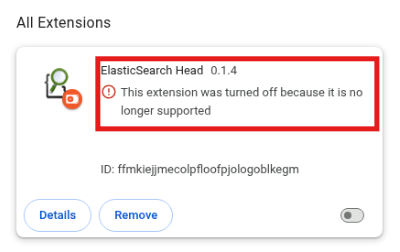
FAQ relevant for: all Academy versions Hi all, Support for Manifest V2 has officially been disabled in Google Chrome, which means the Elasticsearch Head Chrome extension is no longer functioning properly on the VDIs. When you try to add the Elasticsearch Head Chrome extension you may see the following error: "This extension was turned off because it is no longer supported" or this error: "Cannot install extension because it uses an unsupported manifest version. Could not load manifest." We are looking into ways we can resolve this issue, however for now we have a workaround to get the extension working. Latest Workaround Step 1: Go to the Ubuntu terminal and run the following command: nano ~/Desktop/chrome-v2.desktop Step 2: Enter the following and save the changes: [Desktop Entry] Version=1.0 Type=Application Name=Chrome (Manifest V2 Enabled) Comment=Run Google Chrome with Manifest V2 enabled Exec=/usr/bin/google-chrome-stable --disable-features=ExtensionManifestV2Unsupported,ExtensionManifestV2Disabled Icon=google-chrome Terminal=false This will create a new shortcut for Google Chrome which should allow you to add and use the Elasticsearch Chrome extension! (Old) Workaround Here are the steps you can follow to work around this error: Step 1: Navigate to chrome://flags/ in the Chrome browser: Step 2: Disable the following settings: Extension Manifest V2 Deprecation Warning Stage Extension Manifest V2 Deprecation Disabled Stage Extension Manifest V2 Deprecation Unsupported Stage Alternatively on some versions the setting may appear as the following: Allow legacy extension manifest versions In this case you will need to enable the setting as seen above. Step 3: Restart Chrome. Step 4: Re-add the Elasticsearch Head Chrome extension. This comment details how to add the extension to Chrome. You should now be able to use the Elasticsearch Head Chrome extension as normal! Alternative Elasticsearch Query Tool Alternatively you can query your Elastic indices without using the Elastic head Chrome extension! This post walks you through this method: ElasticSearch alternative query tool | Quantexa Community Thanks pashadia for creating this post! Apologies for the inconvenience, I hope this helps!2.7KViews3likes37Comments
DEA Core ER Certification – Official Release
We’re excited to share that the Data Engineer Academy - Core ER Certification is now officially available. This launch marks the start of an evolution for the Data Engineer Academy. Instead of just one learning path, we’ll now offer two certifications: Core ER and Core Platform (which will be available in early April 2026). All content aligns with the latest Quantexa v2.8.x capabilities. The division into two levels better aligns with the realities of solution deployment by our Customers and Q Delivery Teams. The new approach will also support faster onboarding for new engineers whose skills will match specific project requirements. We estimate a 50% shorter time to completion compared with the corresponding content of the previous Academy - approx. 3 weeks full-time for the Core ER program. *Measured against the average completion times for the current Academy. Dependent on the learner’s Spark & Scala capability and time commitment. 🧑💻What does the DEA Core ER Certification cover? The Core ER Certification is designed for anyone interested in the core Entity Resolution (ER) functionality of the Quantexa Platform, with a strong focus on the Data Ingestion stage (ETL). 👩💻What will the DEA Core Platform Certification cover? That program will focus on broader Platform capabilities outside ER (namely, User Interface configuration, Graph Generation, and Scoring). Stay tuned for more updates on this. 🌟What’s new in this release? The improvements to the scope and structure of the new program closely align with the standard operations of Quantexa’s Delivery Teams. Other enhancements include: Dedicated Core ER path: Focused on data ingestion (ETL) and Entity Resolution, guiding learners through transforming raw source data into accurately resolved Entities. Updated content: All content is aligned with the latest Platform capabilities and current best practices. Modular learning journey: The learning experience is broken down into short, focused modules (typically 20–40 minutes each), so learners can progress in manageable steps. Hands-on practice: Learners complete practical activities and assessment tasks based on realistic project scenarios, guided by clear checklists. Improved learning design: Multiple improvements that enhance the learning experience, making it more usable, enjoyable, and focused on practical skills and tangible outcomes. Integrated assessments: Multiple knowledge checks and two main assessments: Assessment 1a: Code Review Assessment 1b: Live Assessment 🏛️DEA Core ER Program – Structure Quantexa Technical Foundations (fast-tracked for data engineers) Part 1 – Introduction (Academy Overview & environment setup) Part 2 – ETL Part 1: Documents (importing data, Parsers, Document Data Model) Part 3 – ETL Part 2: Entities (Entity extraction and loading) Part 4 – Entity Resolution (configuring, executing, and validating ER) 🔗Pre-requisites These stay unchanged: Completion of the Pre-assessment – Spark & Scala 🌉How can I bridge the knowledge gap between the Academies? The Education Services Team is working on additional Community content and online training sessions covering the differences between the Academies and the technical updates. These will be made available after the Core Platform Certification is released, providing a great opportunity for graduates of the previous Data Engineer Academy to keep their knowledge current. 📝 How can I enroll in the new Academy? We are currently in the transition period, with the ES Team replacing training content across Academies. Therefore, until the full release of the DEA Core Platform Certification, the following guidelines apply. I want to become fully certified DE as soon as possible (e.g., due to project commitments). Please enroll in the existing Data Engineer Academy. In the future, you will have an opportunity to familiarize yourself with the updates to the Academy content using the planned Community articles and webinars. My project work only requires Entity Resolution capability. You can enroll now in the new DEA Core ER Certification by following the standard process. We look forward to your feedback! ℹ️ Please make sure you have the prerequisite Scala & Spark skills. I am interested in both new Certifications and I am currently not under any time pressure. You can now enroll in the DEA Core ER Certification (and complete it!), but there might be a brief waiting period before the DEA Core Platform Certification is released in April. I've been enrolled in the current DEA program, but I’d like to switch to the new one. We strongly advise you to continue your learning pathway and complete the current program. In the future, you will have an opportunity to familiarize yourself with the updates to the Academy content using the planned Community articles and webinars. ⚠️ Be advised that following the launch of the DEA Core Platform Certification, the current DEA program will be gradually retired (allowing for all outstanding completions to take place), and no new enrollments will be available. We hope you enjoy the new DEA Academy!202Views2likes0CommentsFAQ: Academy Documentation Links
Hey all! Here are some useful links for the Academies: ETL Configuring .qmodel files Configuring .qentity files Entities, Start Paths, and traversals Defining Traversals Defining Compounds Defining Elements Quantexa Core Library Core Traversals Core Elements Core Templates Address Business Individual Core Compounds Address Business Individual + Individual Synonyms Core Parsers Address Business If Business parse Business If not Business parse Individual Date to Date parts Entity Resolution Resolver Config Resolution Templates Filtered Compounds Compound Exclusions Network Generation Expansion Steps Scoring (v2.1.8) Severity Tooling Assigning Severity to a Score Configuring Score Descriptions Score Descriptions Score Description Rendering Extracting Values from Configuration files Scorecard Configuration For Comprehensions (Scala Documentation) Project Example - Scoring Best Practices UI Search Configuration Expansion Templates Traversal DSL Functions home page Example Note: The Data Engineering is currently on v2.0.1 of the Quantexa Platform and the Scoring Engineer Academy is currently on v2.1.1, however the closest documentation versions we have are for v2.0.8 and v2.1.8 respectively. These versions should be sufficient for you to complete the Academy! Please comment below if you find any other useful links from the Quantexa Documentation Site so we can add them to the list!1.8KViews5likes2Comments
📢 New Education Programs Launch 🚀: Scala & Spark Bootcamp and Data Engineer Velocity Program
Quantexa are delighted to announce the release of the Quantexa Data Engineer Velocity and Scala and Spark Bootcamp Programs. They have been designed to significantly reduce the time taken to obtain Quantexa Data Engineer and Scoring Engineer Certifications. 💻💡 Scala & Spark Bootcamp Duration: 5 Days An in-depth Instructor-led program designed to enable candidates with a background in programming to successfully complete the Scala and Spark Assessment, the pre-requisite entry point to the Data and Scoring Engineer Academies, within a 5-Day period. 💻🏆 Quantexa Data Engineer Velocity Program Duration: 30 Days A program that is designed to enable candidates to successfully gain the Data Engineer Certification within 30 Days via the incorporation of a set of Velocity Workshops at key stages of the education program. 📅 Delivery Format: The programs are offered as both private and publicly scheduled events, based on interest. 📧 Event Scheduling Enquiries: Interested parties should contact their respective Quantexa Alliances, Quantexa Customer Success representative. For further details about these programs please see our Introduction to the Quantexa Academy Article.574Views1like2CommentsFAQ: Gradle taking too long to index
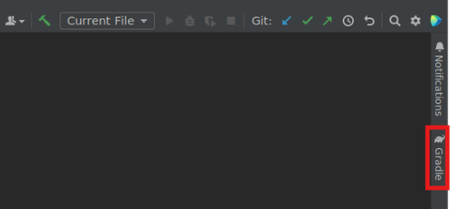
FAQ relevant for: all Academy versions When opening IntelliJ on the Academy VDIs, dependencies may take too long to load, causing the project to not index properly. This happens because IntelliJ attempts to download dependencies but fails as the VDIs do not have access to the internet. We can stop this happening by putting Gradle in offline mode. To do this you need to do the following: First, click on the Gradle panel near the top of the right sidebar: Then, click on the toggle offline mode button: The button will be a lighter grey colour when the offline mode is on Finally, click the refresh button to restart the indexing: Your project should now index a lot quicker (although it may still take 10-20mins)!295Views2likes2Comments