How to submit an idea to the Community
Have an idea for something you would like to see on the Community? Submit it through our Community Suggestion Box. Community Suggestion Box - Quantexa Community Help us make the Community better! Let us know if there is anything that would improve your experience on the Quantexa Community.100Views0likes0CommentsUpdate Your Notification Preferences
Go to Your Profile Settings 👤 Log in to your Quantexa Community account. 📍 Click your avatar in the top-right corner of the page. ⚙️ Select "My Settings" from the dropdown menu. Access Notification Preferences 🔔 Click the "Follows & Notifications" tab. Edit What You Follow 📂 In the same "Follows & Notifications" tab, scroll to "Follows". 👀 Here, you’ll see all the posts, boards, or topics you're following. 🔎 Use the filter to view by types of content (e.g., discussions, blogs, etc.) ⋯ Use the ellipses next to the activity column to Unfollow anything you no longer want updates from. Customize Notifications Scroll to "Email Notifications". Under this section, you can manage: 📬 Email notifications for replies, mentions, private messages, etc. 🔔 Popup notifications in the community interface. ⏰ Frequency of notifications: Immediately, Daily Digest, or Weekly Digest. ℹ️Turn off what you don’t need to avoid inbox overload! Save Your Preferences ✅ Don’t forget to click "Save" at the bottom to apply changes. ⚠️ Changes won't take effect unless saved!100Views0likes0CommentsViewing My Profile
🔐 Log in to your Quantexa Community account. 📍 Click on your avatar in the top-right corner of the page. 🧾 From the dropdown menu, select "My Profile". This will take you to your public profile page, where you can view: 📝 Your bio and job title 🏅 Badges and achievements 🗨️ Posts and replies 📌 Bookmarked content ℹ️You can edit your profile by clicking the "Edit Profile" button on this page!99Views0likes0CommentsNew Quantexa Community Launch - Coming Soon!
We’re excited to announce we will be launching a new Quantexa Community! In mid-May, the Quantexa Community will be moving to a new home, and we can’t wait to share it with you! Why We’re Moving As the Quantexa Community grows, it’s time for us to upgrade to a space that better matches the needs of the Community Members. Our new community platform will offer: 💬Better conversations with improved discussion features 🔔Smarter notifications so you never miss important updates 🎉More events, resources, and ways to get involved What You Need to Do There is nothing to do for now! We will share all the information you need ahead of the move. Want to Get Involved? 📝 Sign up to get involved in Community testing and feedback sessions. 💌 Drop us a note into the Community Suggestion Box. 📊 We’ll be sending out surveys after launch – give us your feedback. Thank You!84Views1like0CommentsUpdating My Profile
Access Your Profile Settings: 👤 Log in to your Quantexa Community account. 📍 Click on your avatar at the top-right corner of the page. ⚙️ From the dropdown menu, select "My Settings". Edit Your Profile Information: In the Personal section, you can update details like your: 👤 Username 📧 Email address 🖼️ Profile picture 💼 Job title (this helps us make sure you get the most relevant information) 📝 Bio – tell us a little more about yourself! Save Changes: 💾After making the necessary updates, don't forget to click "Save" to apply them. (🏅sssshhh...you could get yourself a badge by updating your profile and picture)82Views0likes0CommentsComing Soon: Your New Quantexa Community Launches Wednesday 21st May!🚀
🚀🚀🚀We’re just about ready to welcome you to the new Quantexa Community, launching on Wednesday, 21st May! 🚀🚀🚀 Here’s what you can expect: ✅ Your existing login will still work – no need to reset your password. 🔗 Bookmarked URLs will continue to work – your saved links will take you right where you need to go. 🛠️ Support remains the same – the team is here if you need anything during or after the move. 🌟 Exciting new features and content – easier navigation, smarter notifications, and more ways to connect. Want to Get Involved? There’s still time to contribute to shaping the new Community: 📝 Sign up for user testing and feedback sessions 💌 Share ideas in the Community Suggestion Box 📊 Keep an eye out for post-launch surveys – your input matters! A reminder of why we're moving… As the Quantexa Community grows, it’s time for us to upgrade to a space that better matches the needs of the Community Members. Our new community platform will offer: 💬Better conversations with improved discussion features 🔔Smarter notifications so you never miss important updates 🎉More events, resources, and ways to get involved ✨We can’t wait for you to explore everything the new space has to offer. Thanks for being part of the Quantexa Community!✨67Views1like0CommentsSeptember Community Roundup 🎉
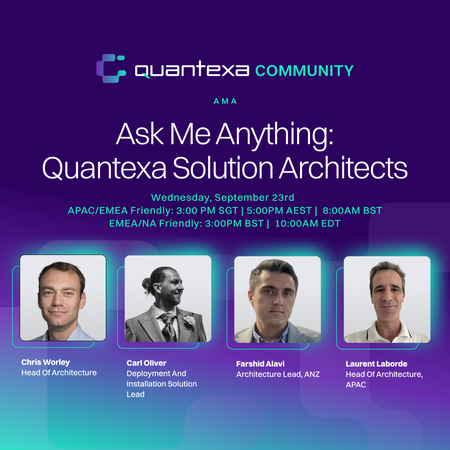
Please note that some content is member-exclusive and requires logging in to view. 🚀 A New Home for Data Scientists The biggest news this month was the launch of our Data Scientists User Group, a dedicated space for data scientists working with Quantexa to connect, share their voice and knowledge, and learn from one another. Are you a Data Scientist? This group is for you. 📚 Fresh Thinking from the Data Science Community The new group wasted no time getting into substantive discussion. Some standout reads from September include: You Can't Automate Understanding, but You Can Automate Context, exploring how context underpins effective AI and enterprise decision-making. Are Context Graphs just Knowledge Graphs?, digging into the rise of the "context graph" concept. Perspectives on AI Bias, a thought-provoking look at real-world cases of bias in automated decision-making. Do cycles hide risk? A Legal Hierarchy and Japan's Keiretsu Networks Story, on uncovering hidden risk in complex ownership networks. Creating and exploring a Q Knowledge Graph, a hands-on guide to the connections hiding in your data. 💬 Ask Me Anything with Our Solutions Architects Members also put their questions directly to our Solutions Architects in a live Ask Me Anything (AMA) session, which covered topics from technical best practices to project advice. Congratulations to Guru, the winner of our recent AMA competition, who submitted three questions that our Solutions Architects answered during the session. Join the Architects group to get involved. 📘 New in the Platform Library Two practical additions landed in September for teams working hands-on with the platform. Scoring Validation Release, a new article series on established practices for score validation, including the complexities of validating network scores. Optimizing Entity Resolution Performance: A Guide, a walkthrough for optimizing ER performance. 🛠️ For the Developers: Documentation MCP September also brought a new tool for building with Quantexa. The Quantexa Documentation MCP, built on the Model Context Protocol (MCP), gives AI coding assistants like Claude direct, searchable access to the Quantexa Platform Documentation. That's all for September. If you have content ideas or requests, get in touch at mailto:[email protected] The Community Team41Views3likes0Comments📢Just 1 day to go: Ask Me Anything with Quantexa Solutions Architects
Don't miss your chance to join our Ask Me Anything with Quantexa Solutions Architects. Whether you have technical questions, want to learn best practices, or are looking for advice on your projects, this is your opportunity to ask the experts. 👉 Sign up now and be part of the conversation. [APAC/EMEA] 3.00pm SGT | 5.00pm AEST [EMEA/NA] 3.00pm BST | 10.00 AM EDT See you tomorrow, and remember: there are no silly questions... only missed opportunities to ask them!31Views0likes0Comments