Recent Discussions

Announcing: The Quantexa Documentation MCP
We are pleased to announce the availability of the Quantexa Documentation Site MCP. It gives your AI assistants direct, searchable access to the Quantexa Platform Documentation. It works with any client that supports the Model Context Protocol: Claude Desktop, Claude Code and most IDE agents. What it covers Semantic and keyword search across the Quantexa Documentation, filterable by component, version, module, page type and category. Full page retrieval of Documentation Site pages, not just summaries. Glossary lookups of precise Quantexa terminology Images and diagrams referenced by a documentation page Connecting & Authentication The server endpoint is https://mcp.quantexa.com/docs. Add it to your coding assistant of choice as a remote MCP server. For example, in Claude Code: claude mcp add --transport http quantexa-docs https://mcp.quantexa.com/docs The MCP uses OAuth for authentication. When you connect, you'll be prompted to a login page, after selecting "Continue as an external user," you can log in using your normal Quantexa Documentation Site credentials Auditing All tool calls and their parameters are logged for audit purposes. Please do not send any information into the MCP that is sensitive. Correct usage of the MCP requires no sensitive material be exposed, this is a documentation MCP server. Please reach out to your Quantexa Architect with any questions!711Views6likes5Comments🚀 Now Available: Quantexa 2.9.0
We're excited to announce the release of Quantexa 2.9.0, bringing expanded Agentic AI capabilities, a new Home Page experience, and faster, simpler deployments with pre-packaged software. Highlights include: 🤖 Q Assist Workspace Agents (Public Preview): Create role-specific AI agents with no-code configuration and controlled tool access. 🏠 New Home Page: A central landing experience that gives users quick access to key platform modules. ⚡ Pre-packaged Software: Accelerate deployments and simplify upgrades with pre-built artifacts and container images. 🔒 Enhanced Security & Stability: Benefit from the latest framework upgrades and vulnerability fixes. 📈 Plus all the innovations delivered across the Quantexa 2.8 release cycle, including Decision Systems, Q Knowledge Graph (Public Preview), and significant user experience enhancements. With support for Quantexa 2.7 ending in January 2027, now is the perfect time to upgrade and take advantage of the latest capabilities. Log in to see the 2.9 Release Note Walkthrough and the Member Exclusive Community update.Jo_Keilt3 months agoCommunity Team143Views0likes0Comments
We are pleased to announce Parsers 4.4
Our latest update is a Parsers release that unlocks enhancements for Quantexa Platform's Entity Resolution capabilities. 🔒Log in to see the full release announcement in our member-exclusive area. Follow Release Announcements 🔔+ to get notifications of new content.Anastasia_Petrovskaia3 months agoQuantexa Team70Views2likes0CommentsThe New Table Experience in Quantexa
We're happy to announce a major upgrade to tables across the Quantexa Platform — bringing consistent behavior, cleaner design, better filtering and sorting, and improved accessibility to every table you work with. Starting from version 2.8.4, with further improvements coming in 2.9, new standardized table components deliver a unified experience across every screen. Learn the controls once, use them everywhere. As part of this work, we're also introducing a Virtual Grid, making tables with thousands of rows feel just as responsive as small ones. This is relevant for every platform user — whether you're browsing records of individuals or businesses, managing work items list, or analyzing transactions data. For details on the new tables, filtering capabilities, Virtual Grid performance, and what to be aware of during the rollout, please refer to the full Release Announcement. There you'll find a detailed descriptions, before-and-after comparisons, and links to relevant documentation. By the way, you can explore our roadmap and give feedback on our features and functionality in our Product Roadmap & Ideas Portal! Be a part of our product development!diana_zamylina5 months agoQuantexa Team73Views1like0CommentsDecision Systems for Capital Markets - GA Announcement
Quantexa’s Capital Markets Anti‑Money Laundering (AML) Decision System is now generally available as part of platform version 2.8.10, extending AML coverage across Trade Execution and Trade Settlement, with initial support for FX Spot and Cash Equities. This GA release introduces key capabilities to improve detection accuracy and investigation efficiency, including: Multi‑Monitored Transaction Support, enabling multiple transaction sources to be ingested and scored within a single alert while preserving the context of each source. Customer Typology Scorecards, providing flexible multi‑scorecard configuration and clearer visibility into how typology‑ and product‑specific risk scores contribute to overall risk. The release also delivers the first set of Capital Markets risk scores, alongside Graph Scripting Auto‑Generation to reduce deployment effort and an Initial Task Networkthat automatically builds rich investigation networks and highlights activity aligned to score triggers. Together, these enhancements accelerate time‑to‑value, increase transparency in risk reasoning, and support more effective investigations. Read more about the Capital Markets use case and recent enhancements for Decision Systems in the full release announcement. Decision Systems for Capital Markets - GA Announcement85Views1like0CommentsConsistent Date and Number Formatting Across the Platform | 2.8.6
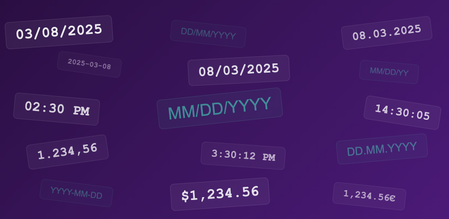
We're happy to announce System Formatters — a new platform capability that makes it easy to keep date, number, and currency formats consistent across every screen. Until now, formatting sometimes had to be configured separately for different modules, which took time, and some platform-wide elements, like the date picker in filters, couldn't pick up those settings. This could lead to situations where the same date appeared as DD/MM/YYYY in one place and MM/DD/YYYY in another, creating unnecessary friction in everyday tasks. System Formatters solve this: an administrator chooses the preferred formats once in the Localization UI, and the entire platform follows those rules. This is especially relevant for US and other non-UK deployments — System Formatters let you align the interface to your regional conventions faster and with broader coverage than before. For details on setup, limitations, and how System Formatters work alongside existing field-level formatting, please refer to the dedicated section in our User Guides. There you'll find a detailed description of the capability, examples with screenshots, and links to relevant documentation. By the way, you can explore our roadmap and give feedback on our features and functionality in our Product Roadmap & Ideas Portal! Be a part of our product development!diana_zamylina6 months agoQuantexa Team64Views0likes0CommentsMigration Guidance to Parsers 4.x | Release announcement
We are happy to share that migration guidance to Parsers 4 is now available on the Quantexa Community. Why & How to Plan a Parsers 4 Migration | Quantexa Community This guide provides support with planning and estimation of the migration to the latest versions of Parsers, and introduces available migration options, as well as provides detailed recommendations on how to make the upgrade smooth and straightforward. Step-by-step Guide to Migrate to Parsers 4.3 | Quantexa Community Step-by-step Guide to Migrate to Parsers 4.2.4 | Quantexa Community As a reminder, Parsers 4 is a requirement for Quantexa 2.8+. More information about the releases can be found here: Welcome to Parsers 4.3 | Release Announcement | Quantexa Community Welcome to Quantexa 2.8 | 2.8.0 Release Announcement | Quantexa CommunityAnastasia_Petrovskaia10 months agoQuantexa Team126Views0likes0Comments
How Decision Systems 2.8.3 integrates with Data Viewer and Explorer
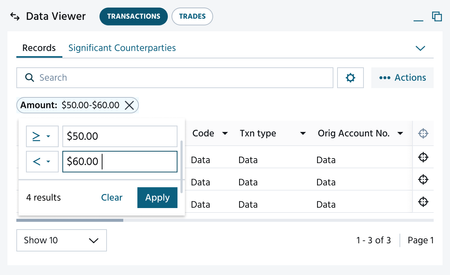
We’re excited to announce that Data Viewer and Explorer are now fully integrated into Decision Systems with version 2.8.3. Why This Matters Data Viewer helps investigators and analysts explore and filter data efficiently during investigations. Data Viewer uses the Explorer API to query data sources and present them in a structured, interactive format. This means: Investigators and analysts can automatically replicate score logic, saving time, minimizing errors, and delivering scale. Score logic is more easily represented, for intuitive filtering of relevant transactions. Complex scores are more easily investigated. How Data Viewer and Explorer work with Scores When an investigator selects a score, Data Viewer and Explorer can display all transactions that triggered that score. Transactions can be shown via queries or transaction IDs. Using queries allows investigators to see the queries in Explorer for deeper investigations beyond the original score. Benefits of integration with Decision Systems Faster implementation: Saves ~0.5 days per score—no longer need to set up Data Viewer and Explorer manually. Reduced maintenance: Queries are automatically sent to Data Viewer and Explorer—no need to manually replicate score logic or update UI queries after tuning. Accuracy and confidence: Automated integration ensures correct transactions are displayed to investigators in Data Viewer and Explorer. Improved user experience: Queries can be explored and amended in Explorer; Data Viewer now supports all scores. Explainer videos Watch these short videos to learn more: 01 Data Viewer and Explorer See how the integration appears in the UI and learn how to configure Data Viewer and Explorer. 02 Data View Integration Setup Understand the data ingestion requirements for using Data Viewer and Explorer effectively.216Views3likes0CommentsDecision Systems for Trade Finance - GA Announcement
We’re excited to announce that Decision Systems Trade Finance has now moved to General Availability as of 2.8. This is a significant milestone that lays the foundations for Decision Systems within Quantexa’s Decision Intelligence Platform. What Are Decision Systems? Decision Systems are Quantexa’s configuration-driven scoring solutions, built on Assess. They are designed for rapid configuration of use case specific decisioning models —enabling faster deployment, consistent performance, and easier adoption across supported use cases. Decision Systems empowers users to: Leverage the full power of Assess without writing code. Move quickly from resolved Entities and Graphs to actionable insights. Use out-of-the-box scores and scoring models based on best practices and domain expertise. Focus on decision execution, reducing time spent on data wrangling and complex data engineering. Supported Use Cases For our most proven solutions in Financial Crime monitoring and compliance, we provide baseline coverage across the entire decision lifecycle, from data, to insight, to decisions with Decision Systems. Supported use cases in 2.8 Trade Finance – General Availability Capital Markets – Early Access Retail Banking – Early Access If you're working on a FinCrime use case not listed, Decision Systems may still be applicable depending on maturity. To determine fit—even for Trade Finance—please speak to your Quantexa Solution Architect to get started. Highlights Although Trade Finance is being announced these highlights are applicable to all supported use cases. Simpler User Experience Conditional Configuration You can now dynamically generate only the necessary configuration to deploy your scoring solution, reducing manual effort, improving clarity, and enabling scalable support for new use cases and product capabilities. Simplified Scorecard, Severity, and Scorecard Group Configuration Streamlined configuration ensures that scores and triggers contribute logically and transparently to final decisions—reducing configuration time and improving investigator efficiency. Simplify Score Roll-Up to Customer, Counterparty, and Relationship You can easily configure the aggregation of transaction, entity, and network risk to customers, counterparties, and relationships without duplicating setup thus, reducing required knowledge, setup time, and improving consistency. Centralized Definitions and Validations on Entity, Relationship and Network Scores You can benefit from centralized configuration, validation, and auto-generation of inputs which ensures consistency and reduces time spent on setup and debugging. Optimized Outcomes Segmentation You can now configure segmentation across scores and scorecards with a simplified, centralised setup which tailors scoring to the subject being alerted, all without modifying your ETL. Score Coverage New customer and relationship transaction scores. Including round amounts, unusual transaction types, dormancy, and hub-and-spoke patterns. This greatly expands coverage and enables detection of a wider range of insights. Trade Finance General Availability Trade Finance refers to the provision of finance and services by Financial Institutions (FIs) for the movement of goods and services, domestically or cross-border. Trade-Based Money Laundering (TBML) is a broad term that includes illicit transactions both within and outside formal Trade Finance operations. This use case focuses specifically on TBML risks represented by transactional documents within Trade Finance. The following graph illustrates a typical Document–Entity model for the Trade Finance use case: For full details of the release, please see Decision Systems on the documentation site. Release notes Migration guide Trade Finance Explainer Videos Our series of explainer videos guides you through deploying a Trade Finance FinCrime scoring solution using Decision Systems. These videos are not a substitute for following the documentation during a deployment. Please ensure you refer to our documentation site for the complete deployment tutorial. 00. Introduction We outline the key outcomes of Decision Systems and summarize the key configuration steps. The following videos will describe those steps in more detail. 01. Configuring Your Solution To get started, we show how to select your use case and define scoring subjects, such as customers and their relationships. 02. Performing Data Mapping Next, we show how to map outputs from data ingestion to the selected use case. The mapping process ensures that the original meaning of the data is preserved and remains consistent across your organization. No changes to the source data are required. 03. Configuring Your Scores We walk through the process of configuring a score using available templates. We show how to define severity levels and UI descriptions. As an example, we use the score Customer with Social Link to Watchlist. 04. Configuring Your Scorecards A scorecard is a key part of a scoring system, translating the complex data into a structured, interpretable score that drives consistent, data-informed decisions. This video shows how to build scorecards by selecting scores, assigning weightings, and grouping related scores. 05. Configuring Your Alerting A critical part of the scoring process is communicating key insights to users and stakeholders. We outline how to configure alerting logic to ensure alerts are meaningful and contain new insights. We explore four key alerting modules: When the overall score exceeds a threshold When a scenario triggers but hasn’t been recently alerted When a scenario’s contribution to the score increases When new information is detected in a scenario 06. Adding an Additional Score For the occasions when you need to adapt your existing scoring solution to incorporate additional scores, this video demonstrates how to add the score Relationship Trading in High-Risk Jurisdiction. 07. Configuring Your Segmentation We show how to define and apply your preferred segmentation to your scores and scorecards. In this case, we exemplify how to account for differences between large corporate and SME customers. 08. Investigating Your Alerts In the final video, we will take you through a full Trade Finance FinCrime Solution in the UI. You will be able to see alert, scorecard and scores.Elizabeth_Lau1 year agoQuantexa Team629Views11likes0Comments
We are pleased to announce the release of Quantexa 2.8.0
Our latest update is a foundational release that will enable existing and future capabilities in our Decision Intelligence Platform and the solutions we offer. 🔒Log in to see the full release announcement in our member-exclusive area. Follow Release Announcements 🔔+ to get notifications of new content.John_Keightley1 year agoQuantexa Team315Views2likes0Comments